
15 Best Data Modeling Tools Compared
This article provides a comprehensive comparison of 15 data modeling tools, categorized by their capabilities, G2 ratings, and pricing structures. It covers enterprise platforms, cloud-based solutions, and free software designed for various use cases, ranging from enterprise semantic modeling and cloud database design to SQL transformations and visual diagramming, helping teams select the right platform for their specific data architecture needs.
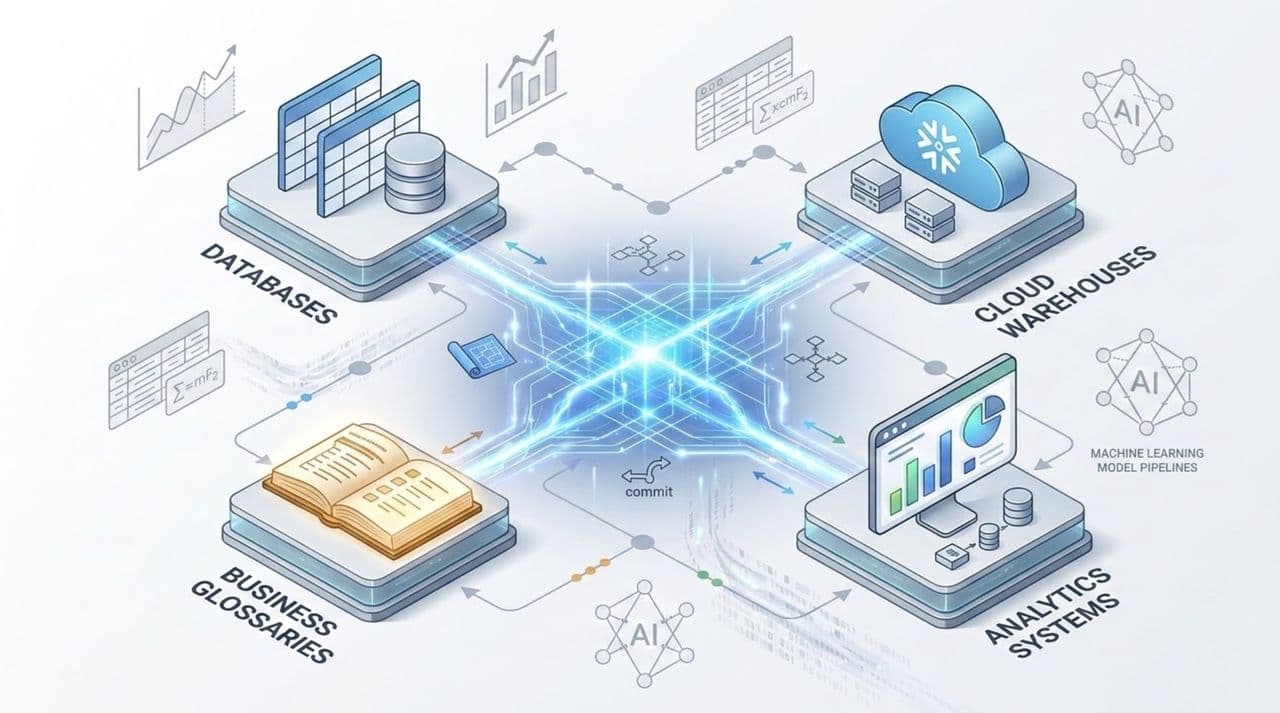
When teams use different tools to define and manage data, it’s easy to end up with conflicting definitions and models that don’t connect. Without a shared semantic backbone, these inconsistencies can show up in reporting, analytics, and AI applications. Teams may spend more time defining terms instead of putting their data to use.
The right data modeling tool can help prevent these issues, but not all platforms are created equal. Some support conceptual, logical and physical modeling, others are focused on database design, cloud transformations or diagramming.
In this article, we compare 15 data modeling tools, including enterprise, cloud, and free options. We will dive into their features, G2 ratings and pricing to help you choose the right fit for your teams.
How we tested each data modeling tool
We evaluated 15 data modeling tools on three main points:
- G2 ratings: User ratings provide insight into customer satisfaction and overall experience.
- Features and capabilities: Conceptual, logical and physical modeling; collaboration; integrations; documentation and other features.
- Pricing: Publicly available plans, starting prices and free options. Where pricing is not included, we have stated that you will need to contact the vendor for a quote.
We covered a variety of modeling needs and budgets, and we have a range of enterprise platforms, cloud-based tools and free software.
Ellie.ai
Best for: Enterprise semantic data modeling and building a shared semantic backbone
Ellie.ai is an enterprise data modeling platform that provides the backbone for a universal semantic layer, helping organizations establish consistent business definitions across their data environments. It supports conceptual, logical, and physical modeling, allowing business and technical teams to define shared concepts and carry them through to technical implementation.
With collaborative modeling, reusable business entities, and a shared business glossary, teams can maintain a common understanding of their data across projects and systems. Ellie also offers over 170 integrations with data catalogs, governance platforms, and development tools, helping teams connect their models and business definitions with the rest of their data ecosystem.
- AI-assisted data modeling
- Data product design and development
- API access, integrations, and model exports
- Conceptual, logical, and physical data modeling
- Version history, snapshots, and review capabilities
- Shared business glossary and metadata management
- Reusable business entities, relationships, and models
- Collaborative workspaces with role-based permissions
G2 rating: 4.2/5
Price: Modeling seat based. Starting at $10,000 per year
SqlDBM
Best for: Enterprise modeling in cloud and hybrid data environments
SqlDBM is a browser-based conceptual, logical and physical data modeling tool. It supports cloud platforms including Snowflake, Databricks, BigQuery, Microsoft Fabric and relational databases. Teams can collaborate on models, track changes through version control and employ forward and reverse engineering to regulate database structures. SqlDBM integrates with a variety of development and governance tools and provides semantic modeling and AI-assisted capabilities.
Key features:
- Semantic and global modeling
- Forward and reverse engineering
- Model versioning and documentation
- Conceptual, logical, and physical modeling
- Collaborative editing and approval workflows
- Integrations with dbt, Git, Collibra, Atlan, and Alation
- Support for cloud warehouses and relational databases
G2 rating: 4.5/5
Price: Custom, per-user pricing. Contact sales for a quote.
erwin Data Modeler
Best for: Enterprise data architecture and multi-database modeling
erwin Data Modeler from Quest Software lets enterprises build, record and manage data structures across many database platforms. It supports conceptual, logical and physical modeling, forward and reverse engineering, schema comparison and modeling standards. It is a good fit for large data architecture teams that demand consistent modeling processes, but its enterprise-focused features may be more than smaller teams need.
Key features:
- Database schema comparison
- Forward and reverse engineering
- Model documentation and reporting
- Naming standards and reusable domains
- Conceptual, logical, and physical modeling
- Support for relational and cloud databases
- Repository-based collaboration capabilities
G2 rating: 4.2/5
Price: Contact SqlDBM for pricing.
ER/Studio
Best for: Enterprise database modeling and metadata governance
ER/Studio is a data modeling tool that helps you manage complex database setups. It allows conceptual, logical and physical modeling, schema development, comparison and documentation. Shared repositories and Team Server enable teams to interact, while connectors with Microsoft Purview and Collibra help tie data modeling to governance. But its huge functionality may be more than small teams or simple database applications require.
Key features:
- Shared model repositories
- Team Server collaboration
- Forward and reverse engineering
- Schema comparison and DDL generation
- Conceptual, logical, and physical modeling
- Metadata management and documentation
- Integrations with Microsoft Purview and Collibra
G2 rating: 4.2/5
Price: Data Architect and Data Architect Pro plans are available starting at $2,687USD and extending to $3,693USD. These are total subscription prices per user.
dbt
Best for: SQL-based data transformation and analytics engineering
dbt is a SQL-based data transformation tool for teams to design, test, and maintain data models for analytics. Developers are able to bundle SQL transformations into reusable models, evaluate data quality and monitor changes through version control. Its Semantic Layer enables teams to define and manage metrics across supported analytics applications. It's important to note that dbt lacks the visual conceptual and logical modeling capabilities of standard data modeling solutions.
Key features:
- Automated data testing
- SQL-based transformations
- Git integration and CI workflows
- Data lineage and documentation
- Modular and reusable data models
- Semantic Layer for metric definitions
- Support for major cloud data platforms
G2 rating: Approximately 4.7/5
Price: A Free plan is available. Additionally, Starter, Enterprise, and Enterprise+ plans are available starting at $100USD/ user/ month and extending to custom pricing solutions for both Enterprise and Enterprise+ plans.
DbSchema
Best for: Database developers working across SQL and NoSQL systems
DbSchema is a visual database design tool to develop and manage database schemas. Developers are able to build models offline and then synchronize changes to a database. It also allows reverse engineering, schema comparison and SQL creation. The Architect Edition provides conceptual and logical modeling capabilities, enabling teams to create data structures before selecting a database platform.
Key features:
- Visual query builder
- Visual schema design
- Forward and reverse engineering
- Support for SQL and NoSQL databases
- Schema comparison and synchronization
- HTML, Markdown, and PDF documentation
- Conceptual and logical modeling in Architect Edition
G2 rating: 4.3/5
Price: A Free plan is available. Additionally, Pro and Architect Edition plans are available starting at $294USD and extending to $470.40USD. Each plan is a one-time purchase.
Redgate Data Modeler
Best for: Collaborative relational database design
Redgate Data Modeler is a cloud-based solution for developing and managing relational database schemas. Developers are able to build models, browse modifications, and generate SQL scripts in a common work space. It supports PostgreSQL, MySQL, SQL Server & Oracle… The Pro plan offers logical modeling, more collaborative features and API access. However, its reliance on relational databases means it’s less suited for teams working mostly with NoSQL systems.
Key features:
- Model versioning
- Reverse engineering
- SQL script generation
- Real-time collaboration
- Browser-based database modeling
- Support for multiple relational databases
- Physical modeling and logical modeling in Pro
G2 rating: 4.5/5
Price: A 14-day Pro trial is available. Standard and Pro plans are also available starting at $189USD/user/year and extending to $303USD/user/year.
SAP PowerDesigner
Best for: Enterprise data architecture and database modeling
SAP PowerDesigner is an enterprise data modeling application that enables you to build, record, and manage data structures. It helps architects translate business requirements into database designs supporting modeling of conceptual, logical and physical designs. It also provides reverse engineering, impact analysis and a central metadata store to trace relationships across models, systems and business processes.
Key features:
- Centralized metadata repository
- Model documentation and collaboration
- Impact analysis and dependency mapping
- Forward and reverse database engineering
- Data model generation and synchronization
- Conceptual, logical, and physical data modeling
- Enterprise architecture and business process modeling
G2 rating: 4.3/5
Price: Contact SAP for pricing.
Hackolade
Best for: NoSQL, JSON, and multi-model data architecture
Hackolade is a data modeling tool for NoSQL & relational databases, APIs and structured data formats. It can be particularly useful to developers dealing with document databases and event-driven systems. Users can visually create schemas, generate platform specific structures and document their data models. However, its emphasis on technical modeling can make it less ideal for teams that need business-focused conceptual modeling and communication.
Key features:
- Model documentation
- JSON Schema and Avro modeling
- Forward and reverse engineering
- Schema validation and generation
- NoSQL and relational data modeling
- Team and workgroup licensing options
- Support for document and multi-model databases
G2 rating: No reviews on G2.
Price: A free 14-day trial is available. Additional plans range from €175/seat/month to €1,750/seat/year.
Moon Modeler
Best for: Visual NoSQL database design
Moon Modeler Moon Modeler is a desktop data modeling tool for document databases like MongoDB, Azure Cosmos DB, and Amazon DocumentDB. It gives developers the space to visually create collections, fields, indexes, and connections. It also provides reverse engineering, schema generation and documentation. Moon Modeler works locally so teams can build and manage their models without sending their project data to the cloud.
Key features:
- Offline modeling
- PDF and HTML documentation
- Forward and reverse engineering
- Visual document database modeling
- Script and validation rule generation
- MongoDB and Mongoose schema design
- Azure Cosmos DB and DocumentDB support
G2 rating: 3.9/5
Price: Basic and Professional plans are available starting at a one-time fee of $99USD and extending to a one-time fee of $169USD.
Oracle Data Modeler
Best for: Free logical and relational database modeling
Oracle Data Modeler is a free application that enables teams to design and document database structures. It offers logical, relational, physical and multidimensional modeling, reverse engineering, DDL generation and design rules. It’s a good alternative for teams working on Oracle databases, or those that want database modeling skills without the price tag of a premium platform.
Key features:
- DDL generation
- Multidimensional design
- Physical database modeling
- Reporting and documentation
- Logical and relational modeling
- Forward and reverse engineering
- Naming standards and design rules
G2 rating: 4.3/5
Price: Free.
MySQL Workbench
Best for: MySQL schema design and database administration
MySQL Workbench combines visual database design, SQL development, and server administration in one package. Developers can use it to build ERDs, define tables and relationships, generate SQL scripts and manage database servers. It also provides schema migration and synchronization. MySQL Workbench is great for teams whose primary database is MySQL, but organizations that use different database platforms may want other modeling tools.
Key features:
- SQL editor
- Migration tools
- Visual ERD design
- Database administration
- MySQL schema development
- Forward and reverse engineering
- Schema comparison and synchronization
G2 rating: Approximately 4.5/5
Price: Contact the sales team for pricing.
Lucidchart
Best for: Data structure diagrams and stakeholder collaboration
Lucidchart is an online diagramming application that you may use to create ERDs, flowcharts, process maps, and other diagrams. It has a drag and drop interface that lets you map out data items and their relationships without needing database development software. Teams can collaborate on diagrams, give comments and share designs with interested parties. Lucidchart is a great tool for visualizing and talking about data structures, but it lacks the sophisticated database engineering capabilities found in more specialized data modeling tools.
Key features:
- Visual ERD creation
- Real-time collaboration
- AI-assisted diagramming
- Comments and sharing controls
- Diagram templates and shape libraries
- Integrations with business productivity applications
G2 rating: 4/5
Price: A free plan is available. Paid Individual, Team, and Enterprise plans are available starting at $9USD/ month.
Visual Paradigm
Best for: Database design and software modeling
Visual Paradigm provides conceptual, logical and physical data modeling, UML diagrams, business process modeling and enterprise architecture. It allows teams to design database structures, produce SQL scripts and reverse engineer existing databases. It also includes model traceability, allowing users to follow the relationships between the multiple layers of modeling. Visual Paradigm is a helpful tool for developers and data architects that are involved in various projects and systems, as it has features for database design and software modeling.
Key features:
- AI-assisted diagram generation
- SQL and DDL script generation
- ERD and UML diagram creation
- Model synchronization and traceability
- Forward and reverse database engineering
- Collaborative modeling and documentation
- Conceptual, logical, and physical data modeling
G2 rating: 4.3/5
Price: Enterprise, Professional, Standard, and Modular plans are available starting at $99USD and extending to $1999USD.
draw.io
Best for: Free database diagrams
draw.io is a free online drawing tool, also available as a desktop software. Users may draw ERDs, architecture diagrams, and process maps using customized templates and forms. Files can be saved locally or in any of the supported cloud storage services. Draw.io is great for visualizing and documenting data structures, but it does not have direct integration with databases or complex modeling features found in specialist data modeling tools.
Key features:
- Local file storage
- Free ERD creation
- Drag-and-drop diagramming
- Image and document exports
- Templates and shape libraries
- Browser and desktop applications
- Optional integrations with Confluence and Jira
G2 rating: 4.4/5
Price: Free web and desktop applications are available. Paid integrations are also available for Atlassian products, with pricing based on deployment and user count.
Key Takeaways
- The data modeling tool you choose depends on what you’re looking for. Some focus on conceptual modeling and business definitions, while others are best used for database development, schema management, or data transformation.
- Not every data modeling tool supports all three modeling levels. If your team needs conceptual, logical, and physical modeling, make sure to check if your tool of choice supports each stage.
- Collaboration is the key to a successful modeling environment. Data modeling tools that provide shared models, business glossaries, and version control can help business and technical teams maintain consistent definitions.
- Choosing a data modeling tool that integrates with your current tech stack is a must. Check whether the tool you’re considering works with your databases, cloud platforms, development environments, and governance systems before committing.
- Free tools are often sufficient for basic diagrams or individual database projects, but larger organizations may need more advanced modeling, collaboration, and governance features.
- The right tool depends on how your team works. Consider who's involved in modeling, the systems you use, and how you'll maintain models as your data requirements change.
Build a stronger data foundation with Ellie.ai
The best data modeling tool depends on your goals. For some, that means designing database schemas or managing SQL transformations. For others, it means bringing business and technical teams together to define data consistently across the organization.
If your organization works across multiple systems, it's worth looking beyond individual modeling features. A shared semantic backbone helps teams reuse business definitions, keep models connected, and maintain consistency as new data products and applications are developed.
Ellie.ai supports this approach with collaborative conceptual, logical, and physical modeling, reusable business entities, and a shared business glossary. Its integrations also help teams connect that business context to the tools they already use. Request a free trial today.
FAQs
What is the difference between a diagramming tool and a data modeling platform?
Tools like Lucidchart and draw.io allow teams to create ERDs and visualize data structures. Specialized data modeling platforms provide more support, including conceptual, logical and physical modeling, reverse engineering and metadata management. For instance, Ellie.ai integrates all three modeling levels using a shared business glossary. Other tools such as ER/Studio and DbSchema provide database engineering capabilities.
What data modeling tools support Snowflake and other cloud warehouses?
Many of the tools in this list are compatible with cloud data platforms. SqlDBM supports Snowflake, BigQuery, Databricks, Microsoft Fabric and dbt helps teams to build and manage SQL transforms across these environments. Ellie.ai also integrates with Snowflake and Microsoft Fabric, enabling teams to connect physical data models to common business definitions.
Can I combine multiple data modeling tools?
Yes. For example, an organization might use Ellie.ai to define business concepts, dbt to manage SQL transformations, and some other platform to design database schemas. Ellie also provides integrations and API access, enabling teams to link models and business definitions to their current tools.
What is the best data modeling tool for regulated industries?
Organizations in regulated industries such as healthcare, insurance, and financial services often need detailed documentation, access controls, version history, and integration with data governance platforms. Ellie.ai supports these requirements through collaborative data modeling, shared business glossaries, role-based permissions, and integrations with Collibra and Microsoft Purview. It also connects conceptual, logical, and physical models, helping teams maintain consistent business definitions across their data environments.
Why should we have a common semantic backbone in data modeling?
Without a common semantic backbone, the same business concepts can be defined differently by different teams and applications. It can lead to inconsistent reporting, duplicated modeling, and confused definitions. Common semantic backbone helps organizations to define common business concepts and relationships, which can drive models across systems. Ellie.ai creates a shared semantic backbone through collaborative modeling, reusable entities and a common business glossary.
How much do data modeling tools cost?
Prices will differ according to your needs. There are free options, such as Draw.io, Oracle Data Modeler and MySQL Workbench. DbSchema offers perpetual licenses starting at $294 USD, while Redgate Data Modeler offers paid subscriptions from $189 USD per user/year. Other platforms require you to reach out to sales teams directly.